Microsoft 365 Outage Full Timeline: Exchange Online Down for 17+ Hours in Incident EX1550543 — Microsoft Reports Improving Stability but Still No Fix Date
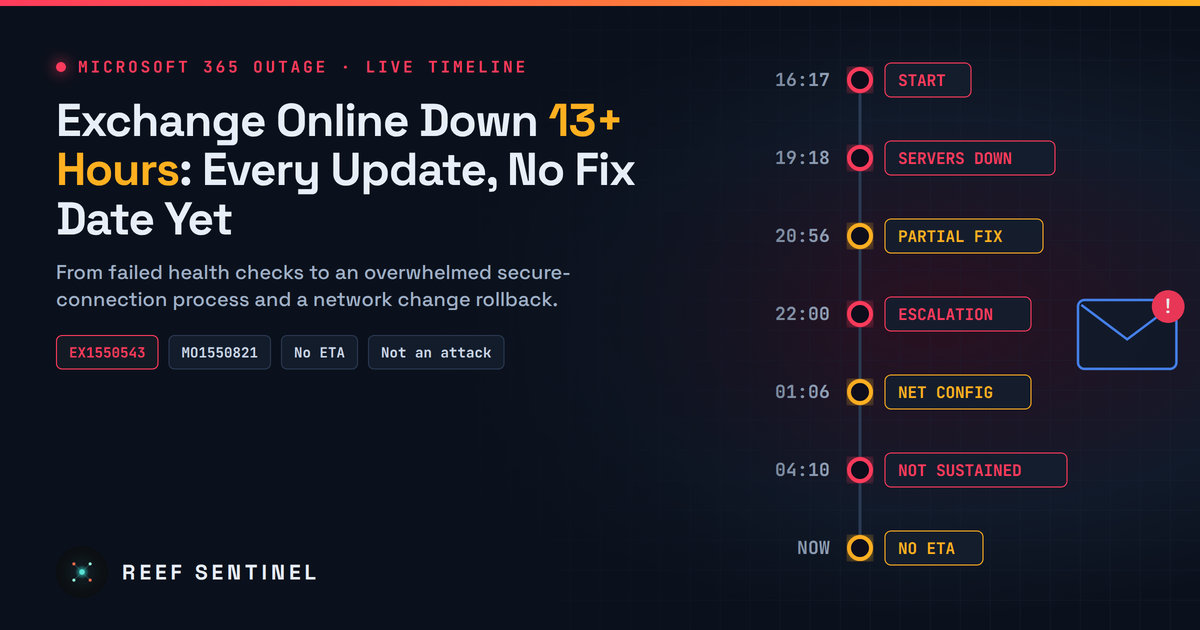
Every update in Microsoft's EX1550543 and MO1550821 incidents, from the first mailbox errors at 20:17 Mauritius time (16:17 UTC) on 12 November to Friday morning's first signs of lasting recovery, plus the suspected cause, affected services and why there is still no resolution time.
Where Things Stand Right Now
Updated about 13:30 Mauritius time (09:30 UTC) on Friday, 13 November 2026.
The Microsoft 365 outage that started on Thursday is still not resolved. It has now run for more than 17 hours. Microsoft tracks it as two incidents in the Microsoft 365 admin center:
- EX1550543: Exchange Online mailbox access (Outlook on the web, desktop Outlook over MAPI, mobile mail over Exchange ActiveSync, and REST API clients).
- MO1550821: a wider Microsoft 365 connectivity advisory covering a growing list of services that depend on Exchange Online.
There is cautious good news. At 10:12 Mauritius time (06:12 UTC) Microsoft said it was still recovering its frontend servers while rolling out further traffic optimisation. At 11:44 Mauritius time (07:44 UTC) it reported "positive results for service stability and increased capacity" from its latest traffic optimisation actions, and said it was applying them more broadly across affected regions to reach a persistent recovery. Some users report Outlook loading again, but slowly.
Microsoft has still not given an estimated time of resolution and has not marked either incident as "Service restored". Recovery so far has been partial and has fallen over before, so it is too early to call it fixed. Microsoft has also said there is no indication of malicious activity. Everything it has published points to an internal capacity and connection-handling failure, not a cyberattack.
This article sets out the full timeline, what Microsoft has said about the cause, which services are affected, and what to expect next. All times are Mauritius time (UTC+4), with UTC in brackets.
Before the Outage: A Separate Teams Problem First
A short, unrelated Teams incident came first. Microsoft tracked it as TM1550488, and it ran from 18:45 to 19:53 Mauritius time (14:45 to 15:53 UTC) on 12 November. It was resolved within about an hour. Microsoft has not linked it to the Exchange Online incident, so it should not be counted as part of the main outage.
Timeline: Thursday, 12 November
20:17 Mauritius time (16:17 UTC): official start. Microsoft's estimated start time for EX1550543. Users in the Americas began failing to reach Exchange Online mailboxes through several connection methods at once.
20:20 Mauritius time (16:20 UTC): investigation opens. Microsoft confirmed it was looking into mailbox access problems.
20:55 Mauritius time (16:55 UTC): scope defined. After reviewing telemetry, Microsoft listed the affected access paths: Outlook on the web (OWA), MAPI, Exchange ActiveSync (EAS) and REST.
21:45 Mauritius time (17:45 UTC): first technical clue. Microsoft reported connectivity errors on the infrastructure that handles access requests and began collecting network logs.
21:54 Mauritius time (17:54 UTC): public acknowledgement. Microsoft's public status channel confirmed it was investigating reports from the Americas.
22:07 Mauritius time (18:07 UTC): global warning. Microsoft warned the impact could affect users "in any region". Outage reports on public tracking sites rose sharply around this point. Outlook reports passed 100,000 at the peak, and Microsoft 365 reports reached the tens of thousands.
22:19 Mauritius time (18:19 UTC): "elevated load". Microsoft said part of its infrastructure was under elevated load across multiple regions. It began restarting and repairing servers and considered redirecting traffic.
22:26 Mauritius time (18:26 UTC): MO1550821 opens. Microsoft opened the wider advisory, warning that users might also be unable to connect to Teams, SharePoint Online, Microsoft 365 Copilot and Defender XDR.
22:29 to 22:57 Mauritius time (18:29 to 18:57 UTC): traffic moved. US traffic was redirected away from the affected infrastructure first. Outlook traffic was then redistributed across Microsoft's worldwide infrastructure while affected servers were restarted.
23:06 Mauritius time (19:06 UTC): deployments frozen. Microsoft paused all deployments and configuration changes as a precaution and began reviewing recent changes.
23:18 Mauritius time (19:18 UTC): the cause is not traffic. Microsoft corrected its earlier explanation. The load did not come from more users. A large number of servers had become unexpectedly unavailable, leaving the remaining servers to carry their work.
23:43 to 23:57 Mauritius time (19:43 to 19:57 UTC): health checks blamed. Microsoft said the servers were failing automated health checks and so were being taken out of service. It said the failures might originate in "a specific component that's responsible for processing server health". At this stage it said it had found no recent change that lined up with the start of impact. It stopped further servers from being removed, tested a bypass for the health check, and looked into high CPU usage. Planner and To Do were added to the list of affected services.
Timeline: Friday, 13 November
00:38 Mauritius time (20:38 UTC): fix hard to confirm. Many servers were so unresponsive that Microsoft could not confirm whether its change was working. It began restarting servers with the change applied.
00:56 Mauritius time (20:56 UTC): first real progress. Microsoft validated an alternative health-check method on a subset of servers, which let them return to service. It began a wider rollout and prepared an automated process to detect and restart unresponsive servers. Purview was added to the impact list.
01:20 Mauritius time (21:20 UTC): impact widens. Intune, Defender for Office 365 and Power BI were added.
01:31 Mauritius time (21:31 UTC): config rollback considered. Microsoft said it was assessing whether reverting "a small number of recent configuration updates" could speed up recovery.
02:00 Mauritius time (22:00 UTC): escalation. Microsoft admitted its actions "have not provided the anticipated relief". It said a core process on affected servers is becoming overwhelmed, causing capacity loss. It said it was "opening all available pathways to restore service", isolating parts of the infrastructure and considering isolating whole regions.
02:57 Mauritius time (22:57 UTC): limited recovery. Some servers were back in service and holding stable, and traffic was moved to alternate routes where possible. Microsoft applied protective traffic limits in one location. Universal Print was added.
03:29 Mauritius time (23:29 UTC): Windows 365 affected. Cloud PCs in tenants that use Purview Customer Key were added to the impact list.
03:59 Mauritius time (23:59 UTC): recovered servers fall over again. Microsoft said servers it had returned to service could fail again once traffic hit them. It limited some traffic types by location and rebuilt a subset of servers on a previous configuration.
04:00 to 04:45 Mauritius time (00:00 to 00:45 UTC): scope clarified. Microsoft narrowed MO1550821 to features that depend on Exchange Online and email, and published a revised impact list for each service.
05:06 Mauritius time (01:06 UTC): root cause comes into focus. Microsoft said a process that establishes secure connections on the affected servers becomes overwhelmed, so the servers stop processing requests. It also identified a network configuration change that correlates with the start of impact and began reverting it. This contradicts its earlier statement that no recent change lined up with the onset.
05:45 Mauritius time (01:45 UTC): positive results. Microsoft reported "positive results" from restarting affected infrastructure and recovering servers "in an isolated manner", and began monitoring for stability.
06:09 Mauritius time (02:09 UTC): capacity added. Capacity improvements were applied where possible.
06:54 Mauritius time (02:54 UTC): setback. Microsoft said the changes were not working as expected and that it had identified alternate ways to restore capacity. Teams, Microsoft Graph and Intune impacts were expanded.
07:34 Mauritius time (03:34 UTC): no sign of attack. Microsoft began reviewing traffic flows and routing and stated there was no indication of malicious activity. Defender for Office 365 impacts were expanded.
08:10 Mauritius time (04:10 UTC): partial recovery, not sustained. Microsoft adjusted traffic protocols, redistributed traffic and applied "strategic blocking". It saw partial recovery in some regions, but the recovery did not hold.
Around 08:56 Mauritius time (04:56 UTC): scaling up. Microsoft described a surge in outbound call volume from its routing services to backend servers, driven by the traffic rebalancing it had carried out. It said it was scaling up virtual machines, fixing machines stuck in a bad state, and forcing those machines to sync the recent network change. It set the next updates for 10:00 Mauritius time (06:00 UTC) and 10:30 Mauritius time (06:30 UTC).
10:12 Mauritius time (06:12 UTC): frontend recovery. Microsoft said it was continuing to recover its frontend servers while implementing further traffic optimisation actions to improve stability and increase capacity, and pointed customers to MO1550821 for a fuller update.
11:44 Mauritius time (07:44 UTC): first signs of lasting recovery. Microsoft reported "positive results for service stability and increased capacity" from its latest traffic optimisation actions. It said it was rolling these actions out more broadly across affected regions as it seeks persistent recovery. This is the most encouraging update since the outage began, but Microsoft has not said service is restored.
What Caused It (So Far)
Microsoft has not published a root cause yet. Based on its own updates, the most likely sequence is:
- A recent network configuration change (which Microsoft now says correlates with the start of impact) left servers in a bad state.
- On those servers, the process that sets up secure connections became overwhelmed, so the servers stopped answering requests.
- Automated health checks marked the servers as failed and removed them from service. The remaining servers took on their load and started failing too, which made the outage spread.
- Recovery efforts then created their own problem. Rebalancing traffic produced a surge of calls from the routing layer to the backend, which pushed servers that had just recovered back over the edge.
This is a classic cascading failure: self-healing automation and traffic shifting meant to protect the service ended up making things worse. Microsoft's final post-incident review should confirm or correct this picture.
Which Services Are Affected
According to Microsoft's revised impact list, the outage is hitting most things that rely on Exchange Online:
- Exchange Online: mailbox access over OWA, MAPI, EAS and REST, plus delayed email delivery.
- Microsoft Teams: calendar, meeting scheduling and edits, live and virtual events, contact sync, app chat, channel creation and deletion, and some Copilot responses. Joining calls and meetings, group chats and channel messaging were reported as largely unaffected.
- SharePoint Online: features that depend on Exchange Online.
- Microsoft 365 Copilot and Copilot Chat: may fail to load or respond.
- Microsoft Graph: timeouts on requests for Exchange data.
- Defender for Office 365 / Defender XDR: Safe Links, Safe Attachments, quarantine, Threat Explorer and related policy functions.
- Microsoft Purview: sensitivity labels, RBAC and several other compliance functions.
- Microsoft Intune: enrolment, check-in and compliance policy evaluation, intermittently.
- Planner, To Do, Universal Print, Power BI / Fabric, the Microsoft 365 admin center and the Microsoft 365 Apps admin center.
- Windows 365: Cloud PCs in tenants using Purview Customer Key.
The Defender and Purview impact matters for security teams. While it lasts, some email protection, quarantine review and investigation tooling may not behave normally.
When Will It Be Fixed?
Microsoft has still not given an expected resolution time, and no reliable date or hour has been published anywhere. What we know as of about 13:30 Mauritius time (09:30 UTC) on Friday:
- The outage has passed 17 hours. Microsoft's last public update was at 11:44 Mauritius time (07:44 UTC), when it reported improving stability and capacity and began rolling its traffic fixes out to all affected regions.
- Earlier recovery attempts were partial, regional and unstable: servers came back, then fell over again under load. The 11:44 (07:44 UTC) update is the first one to talk about persistent recovery, which suggests the fix is finally holding where it has been applied.
- If it keeps holding, expect recovery to be gradual over several hours, region by region, rather than a single switch back on, as apps reconnect and delayed mail is delivered.
- Even after Microsoft declares the incident resolved, expect queued and delayed email to keep arriving for a while, and some clients may need restarting before they reconnect.
Watch the incident IDs in the admin center for the moment Microsoft marks EX1550543 and MO1550821 as "Service restored". That is the official end point and the time that will count for SLA purposes.
Security Risks While Microsoft Is Down
An outage this large is a gift to attackers, even when the outage itself is not an attack:
- Outage-themed phishing. Expect fake "Microsoft 365 service restored, please sign in again" emails, bogus status pages, and messages telling users to "re-verify" mailboxes. Users who have been locked out for hours are more likely to type their password into any login page they see.
- Helpdesk impersonation. Attackers posing as IT support may call or message staff offering to "fix Outlook", aiming to get MFA codes or remote access.
- Weakened email defences. With Safe Links, Safe Attachments and quarantine affected, some malicious mail could slip through or go unchecked once mail flow resumes. Review quarantine and delivery logs after recovery.
- Missed alerts. Security, backup and monitoring alerts that go to Exchange Online mailboxes may have been delayed or lost.
What IT and Security Teams Should Do Now
- Follow EX1550543 and MO1550821 in Service health in the Microsoft 365 admin center. If the admin center itself is slow, use Microsoft's public status page and status social media account as backups.
- Tell staff now: Microsoft will not ask them to sign in through an email link to "restore" their mailbox, and IT will not cold-call them asking for MFA codes.
- Switch to an out-of-band channel (phone tree, SMS, or a non-Microsoft chat tool) for urgent internal communication until mail is stable.
- Make sure critical alerts reach someone. Temporarily route SIEM, EDR and backup notifications to a channel that does not depend on Exchange Online.
- After recovery, check message trace for delayed or bounced mail, review quarantine and Threat Explorer for anything that arrived during the degraded window, and confirm Intune compliance check-ins have resumed.
- Keep records. Save the timeline and Microsoft's preliminary and final post-incident reviews for SLA credit claims and your own incident documentation.
You can poll the incident status from a script during the outage with Microsoft Graph:
Connect-MgGraph -Scopes "ServiceHealth.Read.All"
Get-MgServiceAnnouncementIssue -Filter "id eq 'EX1550543' or id eq 'MO1550821'" |
  Select-Object Id, Title, Status, StartDateTime, EndDateTime, LastModifiedDateTime
What Happens Next
Once service is restored, Microsoft normally publishes a preliminary post-incident review (PIR) in the admin center within a few days, and a final report later. The key questions it needs to answer:
- Which network configuration change triggered the failure, and why it was not caught before rollout.
- Why the secure-connection process on the servers became overwhelmed.
- Why automated health checks removed so much capacity at once instead of protecting the service.
- Why traffic rebalancing caused a second surge that undid early recovery.
For most organisations, this outage is a reminder that mail, chat, files, AI assistants and parts of the security stack now share a single point of failure. Reef Sentinel will update this story when Microsoft confirms the service is fully restored.