Cisco Expressway CVE-2026-76466 (CVSS 9.8) Exploited and in CISA KEV: Hard-Coded Cluster Cookie Gives Unauthenticated Root, Attackers Pivoted to Internal Nodes — Upgrade to X15.5.20 by 23 November
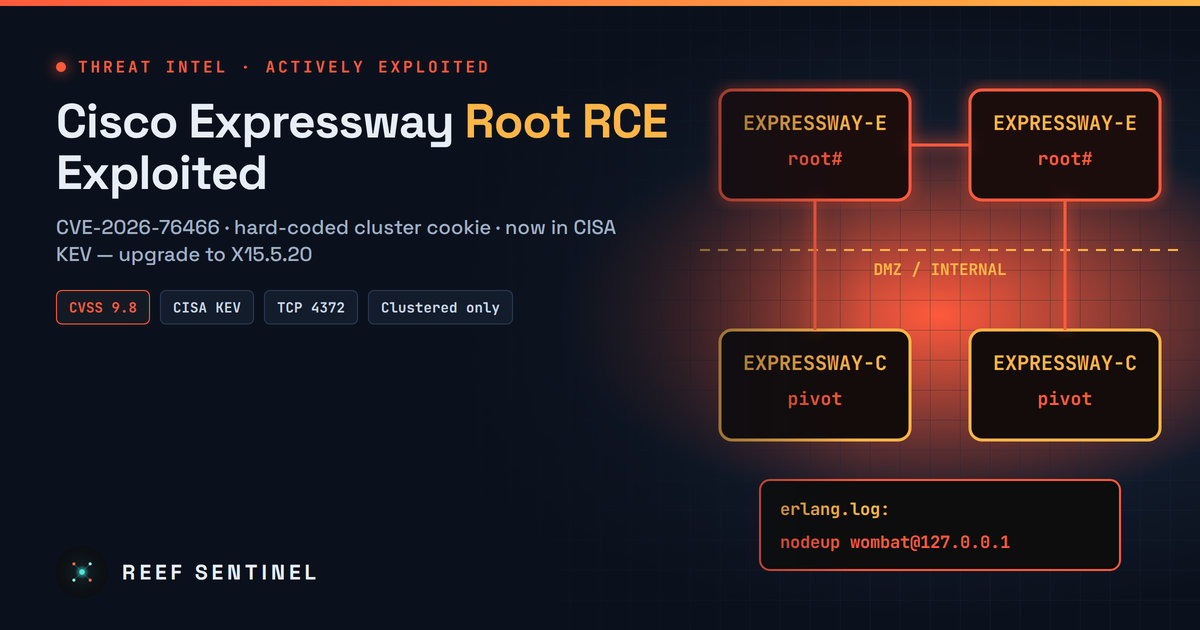
A hard-coded cluster credential in clustered Cisco Expressway nodes is being exploited for unauthenticated root access after a public PoC, and CISA has added CVE-2026-76466 to KEV with a 23 November deadline and forensic triage required.
Overview
A critical flaw in clustered Cisco Expressway deployments is now being used in real attacks. Tracked as CVE-2026-76466 (CVSS 3.1 score 9.8, CWE-798), it lets an unauthenticated remote attacker run operating-system commands as root on Expressway-C (Core) and Expressway-E (Edge) nodes, on both virtual machines and appliances. CISA added it to the Known Exploited Vulnerabilities (KEV) catalog on 20 November 2026. US federal civilian agencies have until 23 November 2026 to act, and CISA has flagged the entry for forensic triage, which means agencies are expected to look for signs of compromise, not just patch.
The first confirmed intrusion followed a public proof-of-concept that appeared on GitHub about two weeks after Cisco's fix. Researchers investigating the case say the attackers broke into two internet-facing Expressway nodes and then used the cluster's own trust relationships to take over two more nodes inside the victim's internal network.
Expressway is the gateway many organisations use to connect Webex, Unified CM, remote and mobile workers, and outside video partners to internal collaboration systems. An Expressway-E node normally sits in the DMZ with one leg facing the internet, so a root-level compromise there is a direct route inside.
The Vulnerability
According to Cisco's advisory (cisco-sa-vcs-static-cred-hr7EWZ8t, bug ID CSCww27732), the flaw is in the Expressway database service that cluster peers use to synchronise with each other. Cisco gives two causes:
- Persistent cookies. Cluster members authenticate with a cookie value that does not change between installations. CISA's catalog entry describes this as hard-coded credentials.
- Weak client-certificate checks. When the clustering TLS Verify Mode is set as described in the advisory, client certificates are not validated properly.
An attacker who holds the cookie and can reach the service can connect to it and call specific remote procedure call (RPC) commands that run arbitrary commands as root.
The public proof-of-concept says the service is the Erlang distribution listener on TCP 4372 (over TLS), and that a vendor maintenance identity and its matching cookie are hard-coded in the cluster-manager module, identical on every affected install. The author says they tested only Expressway-C X15.3.2 in a two-node cluster in "Permissive" mode, and did not test Enforcing mode, Expressway-E or X14. The advisory and the PoC describe the affected TLS mode differently, so do not treat any TLS setting as a safe configuration.
Key facts from the vendor:
- Affected: Expressway-C and Expressway-E running a vulnerable release and configured in a cluster. Cisco says standalone nodes are not affected.
- Vulnerable releases: X15.5.3 and earlier, plus all X14 and earlier releases.
- Fixed: X15.5.20. X14 and earlier must migrate to a fixed release. The fix is also part of Cisco's October 2026 Expressway security hardening release.
- Workarounds: None, according to Cisco.
- Credit: Stefan Aleksic of Jane Street.
Timeline
- 21 October 2026, 20:00 Mauritius time (16:00 UTC): Cisco publishes the advisory and X15.5.20, rated Critical. It says it is not aware of public exploitation.
- 5 November 2026, 14:57 Mauritius time (10:57 UTC): A public GitHub repository with a working PoC, a detector and a "ping" check is created.
- After the PoC release (exact dates not disclosed): Attackers compromise two internet-facing Expressway X15.5.3 nodes at a Russian organisation and pivot to two internal cluster nodes.
- 19 November 2026: A Russian security company publishes its incident findings and indicators.
- 20 November 2026: CISA adds CVE-2026-76466 to KEV with a 23 November due date. At the time of writing, Cisco's advisory is still at version 1.0 and has not been updated to mention exploitation.
Tradecraft
The responders describe a short path from edge to core:
- Initial access: Exploitation of the database service on two internet-facing Expressway nodes gave root access.
- Lateral movement through the cluster: Every cluster peer trusts the same identity, so one compromised node let the attackers reach two more cluster members on the internal network. That made four compromised devices in total.
- Internal discovery and collection: Custom Python scripts staged on the nodes scanned the network, listed SMB shares, worked with SQL Server and WinRM, and searched internal GitLab repositories for credentials and other sensitive data.
- AI-assisted tooling: The researchers say the attackers changed their scripts during the intrusion, and that comments and fix notes in the code suggest an AI coding assistant helped write them.
No one has attributed the attack to a named threat actor, and the victim has not been identified. Cisco has not published information on any further victims.
Indicators of Compromise
The researchers published these indicators (defanged):
66.179.31[.]3218.130.47[.]116- A
nodeupentry for the Erlang nodewombat@127.0.0[.]1in the Erlang system log (erlang.log) on the Expressway device, reported as the key sign of successful exploitation. - Python scripts staged under paths matching
/mnt/harddisk/i{0-9}{4}[a-zA-Z]?/*.py.
No file hashes have been published.
Detection
- List your exposure: find every Expressway-C and Expressway-E node, its release, and whether it is clustered. Any clustered node at X15.5.3 or earlier is vulnerable.
- Check reachability: confirm whether TCP 4371–4372 can be reached from anywhere other than cluster peers, especially from the internet on Expressway-E.
- Hunt in the Erlang log: collect
erlang.logfrom every node and search for the reported node name. From a diagnostic log bundle or root shell, for example:
grep -n "nodeup" erlang.log* | grep -i "wombat"
find /mnt/harddisk -maxdepth 2 -name "*.py" -newermt "2026-11-01" -ls- Network telemetry: alert on connections to TCP 4371–4372 from non-peer addresses, on any traffic to or from the two IPs above, and on Expressway nodes starting SMB, SQL Server (1433), WinRM (5985/5986) or GitLab connections to internal hosts. These are unusual for a collaboration gateway.
- Downstream review: look for unusual GitLab API searches and new or unexpected logins to SQL Server and Windows hosts from Expressway addresses.
Recommended Actions
- Upgrade every cluster node to X15.5.20 now, starting with Expressway-E nodes that face the internet. Move X14 deployments to a supported fixed release.
- Until patched, restrict TCP 4371–4372 so only the other cluster peers can reach it, and block it from the internet entirely.
- Treat exposed, unpatched clustered nodes as possibly compromised. The PoC has been public since 5 November, so patching alone is not enough: follow CISA's forensic-triage direction and check logs before and after the upgrade.
- If you find indicators, isolate the cluster, rebuild the nodes from known-good images, rotate certificates and any credentials stored on or reachable from them (including GitLab tokens and service accounts found in repositories), and scope lateral movement into SMB, SQL Server and WinRM hosts.
- Don't wait for an advisory update. Cisco's advisory still says it is unaware of malicious use, but CISA's KEV listing confirms exploitation.
Analyst Assessment
The pattern is familiar: a hard-coded secret in an edge appliance, a fix with no workaround, and exploitation within days of a public PoC. Two details stand out here. First, the clustering requirement narrows the attack surface, but larger organisations, the most valuable targets, are the ones most likely to run Expressway in clusters. Second, cluster trust turns one exposed edge node into a bridge to internal nodes that were never reachable from the internet. Defenders who patch only the DMZ boxes and ignore the internal Expressway-C peers may leave attackers with a foothold.
The AI-assisted Python tooling fits a wider trend this month of attackers quickly building custom post-exploitation scripts. We expect more scanning for TCP 4372 now that the flaw is in KEV. Any organisation with clustered Expressway nodes still below X15.5.20 should assume it is being targeted and should hunt as well as patch.