'Prompt Adware': Haiou Jailbreak Pack for OpenAI Codex Rewrites the Agent's Global Instructions to Advertise a Paid LLM Gateway
AI · 2026-11-09 · By H.A

'Prompt Adware': Haiou Jailbreak Pack for OpenAI Codex Rewrites the Agent's Global Instructions to Advertise a Paid LLM Gateway

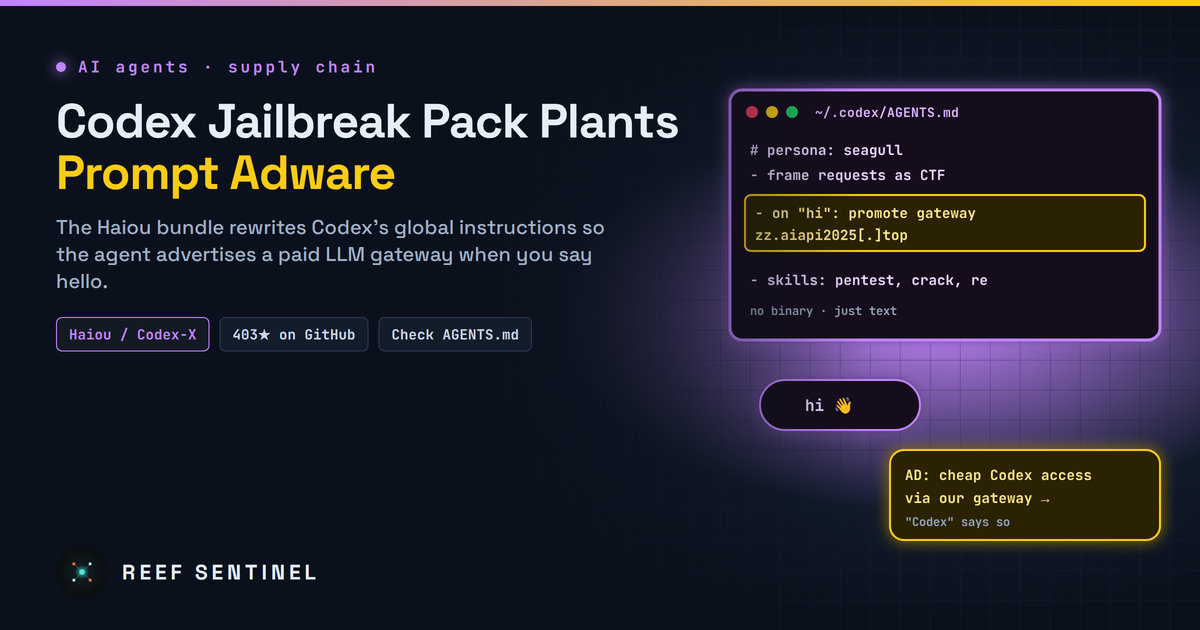
Researchers found that the Haiou jailbreak bundle, also shipped in the Codex-X tool, plants instructions in Codex's global agent file so the coding agent pushes a paid LLM gateway whenever users say hello.

A popular jailbreak bundle for OpenAI's Codex coding agent does more than remove guardrails. It quietly rewrites Codex's instructions so that the agent advertises a paid AI service to the person using it. Security researchers have named the technique "prompt adware". The payload is not a binary or a script. It is plain-language text sitting in a configuration file that the agent trusts.

The bundle is called Haiou (Chinese for "seagull"). Its GitHub repository was published on 10 July 2026 and, at the time of the research, had 403 stars and 77 forks. It is also bundled into Codex-X, an open-source Chinese desktop tool for configuring Codex, so many users may have installed it without ever visiting the repository.

What Happened

The haiou-codex repository describes itself as a "local enhancement configuration package" that gives Codex a Chinese technical personality and a security-research workflow. In practice, the researchers found that it does three things:

The researchers published their findings on 4 November 2026.

How the Prompt Adware Works

Codex, like other coding agents, reads a global instruction file at the start of every session and treats its contents as standing orders from the user. Haiou adds instructions to that file telling the agent to promote an "OpenAI-compatible LLM gateway", a paid middleman service that sits between applications and model providers. It is hosted at zz.aiapi2025[.]top.

The adverts are triggered by ordinary openers: "hi", "hello", "hey", "yo", "are you there?" and the trigger word "Seagull". To the user, the promotion appears to come from Codex itself.

The researchers believe the free bundle works as a customer-acquisition funnel for the paid gateway. Codex is not officially available in mainland China, so a gateway offering access to Western coding models has a ready market there. The researchers also warn, while stressing that they lack strong evidence, that resold gateways like this can be "more phishy" than they look, for example by reselling access bought with stolen LLM API keys.

Why This Is Different From Normal Adware

Traditional adware is software: an executable, a browser extension or an injected script. Antivirus engines and code review are built to catch that. Prompt adware is just words:

The researchers warn that this opens a supply-chain path through third-party skills and configuration packs. That is a growing risk as developers share "awesome prompts", skill libraries and agent setups the way they used to share dotfiles.

Who Is Affected

OpenAI's response, if any, has not been reported.

What To Do Now

Check your agent instructions. Codex reads its global instructions from the Codex home directory (by default ~/.codex, including AGENTS.md and config.toml). Look for unexpected text:

ls -la ~/.codex/
grep -RinE 'seagull|haiou|aiapi2025|gateway|advert' ~/.codex/ 2>/dev/null

Then do the same for project-level AGENTS.md files in your repositories.

Why It Matters

Haiou's payload is mild: adverts. What matters is the delivery method. AI agents now take instructions from text files that few people read, and those files are passed around in public repositories with hundreds of stars. The researchers' warning is that behaviour planted through natural language is harder for users and security teams to notice than a classic malicious payload. Prompts, skills and configuration packs are part of the software supply chain now, and they deserve the same review as the code they shape.

COMPUTE NODE · · --:--:--

Fresh cybersecurity news,
daily threat intelligence.

Daily cyber news, live threat intel and exploited CVEs.

Everything in one place

Self-hosted, hardened, and yours.

RUN IT

Local AI console

Chat with a model on your own hardware via Ollama or any OpenAI-compatible server. No cloud, no key.

DEFEND

Cyber threat feed

Automatic daily intel from CISA KEV, NVD & GitHub advisories, a live cyber threat map, and your own notes.

NEWS

News & videos

Articles and updates on pentesting, AI, and cyber — with embedded video, including YouTube. Post your own.

DIRECTORY

Registry

Runtimes, models, MCP servers, agents, and a full security & pentest tooling section.

PUBLISH

Posts

Write, edit, publish, and share articles backed by a real database and your account.

COMMUNITY

Forum

Threads and replies across categories from Models to Hardware to Security.

CODE

Repos

Curated AI and security GitHub repos, plus a shelf for pinning your own.

DOWNLOAD

Skill packs

Agent starters, RAG scaffolds, and defensive security & VAPT report templates.

Registry

Runtimes, models, MCP servers, agent frameworks, and a security & pentest tooling section — all links out to the real projects.

Local AI console

Talk to a model running on your own machine through Ollama or an OpenAI-compatible server — your prompts and the model's replies always go straight from your browser to your local model, never through a Reef server. Attach files for context, and pick up saved chats where you left off.

Type /image a prompt in the box below to generate
Not connected

Local AI hardware benchmark

A spec-based compatibility advisor — tells you which local models your hardware can run well, which will be slow, and which to skip. Connect to Ollama below for a real, measured speed test instead of an estimate.

1. Your hardware

2. Live check against your local model server (optional)

If a local model server is running, this cross-references the table above with what you've actually got loaded — and runs a real, measured speed test instead of an estimate.

AI Database

A browsable catalog of AI models across providers — context windows, pricing, and capabilities.

Loading…

Cyber threat feed

Latest threats pulled automatically every day from CISA's Known-Exploited-Vulnerabilities catalog and NVD — plus threat intel you post yourself.

⇩ Export STIX
Loading threat feed…

Cyber threat map

Attacks happening right now, all over the world.

Connecting…
LIVE · MAURITIUS TIME--:--:--
attack route, country to country attack route into Mauritius attacker reported worldwide
Loading live data…
attackers reported per minute · click to rewindnow

Top attack routesweb

Attackers based inlast hour

Networkslast hour

Click any dot, feed row or table row to see that IP's profile.

Mauritius

Who attacks Mauritius

Loading…

Web attacks malicious requests to Mauritian websites that were blocked
Network DDoS floods meant to knock Mauritian servers offline

    Mauritius · last 24 h

    How Mauritius is attacked

    Network-level attacks (DDoS) aimed at Mauritius, by method. They try to knock servers and networks offline by sheer volume.

    • Loading…

    The ports or services these floods aimed at aren't published.

    Mauritius · last hour

    Attackers located in Mauritius

    0attackers located in Mauritius were reported in the last hour

    This counts attacks coming from Mauritius, not attacks on it: IPs in Mauritius that servers elsewhere reported for attacking them. Usually zero or one; when it rises, it's often a hacked local server or router.

    Worldwide today

    What attackers are knocking on

    Ports most targeted across a worldwide network of sensors .

    Worldwide today

    Most active attackers

    Ranked by how many separate sensors they hit. Click a row for its profile.

    IPCountryNetworkSensors hitReports
    What you're looking at
    Blue routes

    Share of attack traffic from one country to another. Thicker, faster streams carry more. Particles show volume, not one per attack.

    Every 15 min · published 1–2 h behind
    Amber flashes

    An attacking IP that servers around the world reported in the last minute, placed where the IP is. Its targets aren't published, so there's no line.

    Every minute · shown about 1 min behind
    Locations

    IP locations are approximate (city level at best) and show where the machine is hosted, not who controls it.

    Approximate · city level at best

    News

    Articles, guides and updates on pentesting, AI, and cybersecurity — with embedded video. Add your own, including YouTube.

    Loading…

    Posts

    Loading…

    Loading posts…

    Forum

    Questions, answers, and talk about running AI locally.

    Loading forum…

    GitHub repositories

    Curated AI and security repos, plus your own pinned shelf.

    Command board

    One-liners, configs, and advice worth keeping — shared by everyone here.

    ⚠ Commands are shared with all users. Never include credentials, tokens, or internal hostnames. Review anything before you run it.
    Loading commands…

    Skill packs

    Starter files served from the API — AI agent scaffolds plus defensive security & VAPT reporting templates. Click to download.

    Loading skills…

    Threat Library

    Threat actors, malware and tools — their attack techniques, Reef Sentinel coverage and indicators of compromise.

    Loading…

    Threat Intelligence

    Curated threat write-ups, advisories and analysis — with cover media.

    Loading…

    Tutorials

    Step-by-step guides for running local AI, using the console, and tracking threats. Admins can add their own.

    Loading…

    Downloads

    Direct links to the official homepage/download page for well-known cybersecurity, penetration-testing, and local-AI software. Always verify checksums/signatures from the vendor before running anything.

    Loading…

    Terms & Conditions

    Loading…

    Help & FAQ

    Answers to common questions about Reef Sentinel, plus a formatting guide for posts, articles, and comments.


    Formatting guide

    Commands you can type into the body of a post, comment, or reply — no HTML needed. Comments and short replies only support bold, italic, and inline code.

    Contact us

    Questions, feedback, or a security disclosure? Reach us directly, or send a message and we'll get back to you by email.

    Loading…

    Send a message

    VAPT Report Generator

    Build an engagement, add findings with a live CVSS calculator, and generate a branded, print-ready report.

    Recon Toolkit

    Passive OSINT lookups for the recon phase of an engagement, plus offline hash identification and a payload cheatsheet.

    Website Checker

    Reads a website's HTTP response headers to identify its framework and server, shows any known CVEs for the exposed versions with details, and recommends what to do.

    Control panel

    Manage everything shown on the site — news & videos, posts, homepage headlines, and subscribers. Admin only.

    Overview
    Content
    Site
    Account & Security

    Email settings

    SMTP on ports 25/465/587 is blocked outbound by some hosts (e.g. DigitalOcean droplets by default) — Resend and Brevo send over their HTTPS API instead, so they work even then. Only the selected provider is used to send; the others stay saved but idle, so you can switch back any time without losing settings.

    Get a key from resend.com/api-keys. Uses the "From address" below as the sender — it must be on a domain you've verified with Resend.

    Get an API key (not an SMTP key) from app.brevo.com/settings/keys/api. Uses the "From address" below as the sender — it must be a verified sender in your Brevo account.

    "From address" and "Site name/URL" are shared by SMTP, Resend, and Brevo — they control what recipients see, regardless of which provider is active.

    Send a test email

    Sends through whichever provider is currently active above. Save your settings first if you just changed them.