GhostMap: One Malformed App Can Trap Android 10+ Phones in a Crash Loop Only a Factory Reset Fixes — and Google Says It Won't Patch It as a Security Bug
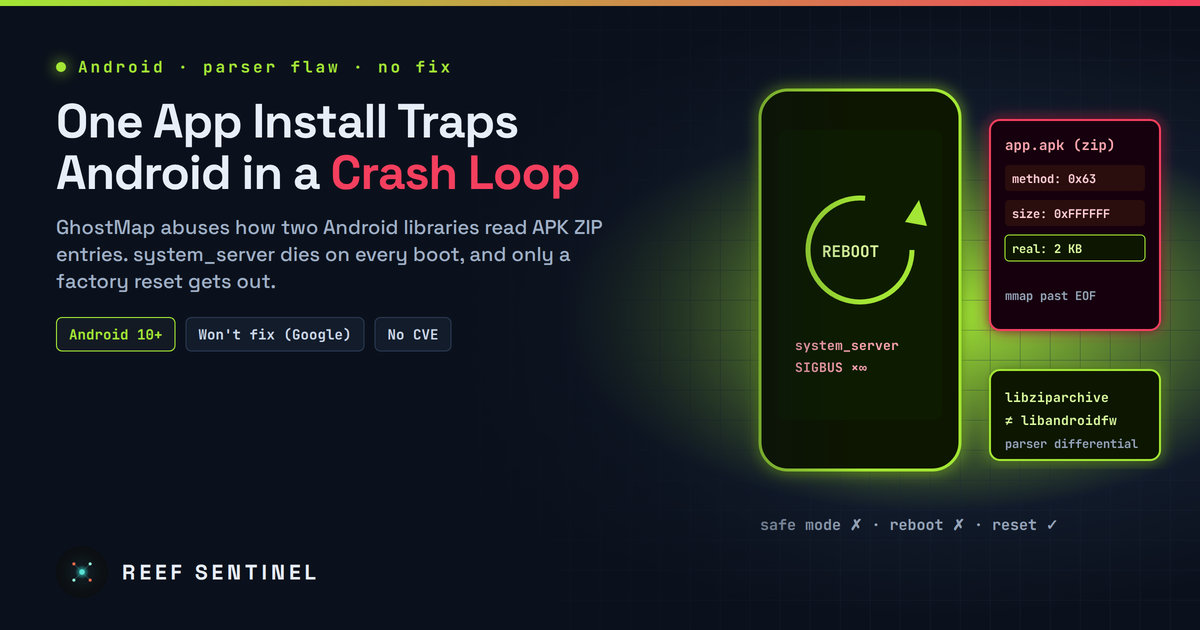
Researchers found that a permissionless, never-opened APK with malformed ZIP metadata can crash Android's system_server on every boot, and Google has declined to fix GhostMap in a security update.
One app install can be enough to leave an Android phone stuck in a loop it cannot get out of. Security researchers at Bitdefender Labs have published details of GhostMap, a flaw in how Android reads the ZIP structure inside APK files. A malformed app needs no permissions and never has to be opened. Once it is installed, a core system process crashes, restarts, reads the same file, and crashes again. For most people the only way out is a factory reset, which wipes everything stored on the phone.
Google has declined to treat the issue as a security bug. As of 5 November 2026 there is no fix and no CVE.
What Happened
The research started on 12 August 2026, when an APK collected from the wild crashed Bitdefender's analysis emulators during installation. The sample was a packed banking-malware dropper. It only made the installation fail and did not persist. That led the researchers to the parsing bug underneath, and they then built a proof of concept that turns it into a persistent crash loop.
They reproduced the loop on a Pixel 10 running Android 17 with the 5 August 2026 security patch, and say it also works on older releases. They report that the flaw affects Android 10 and later.
Technical Details
GhostMap is a parser differential: two parts of Android read the same ZIP metadata and reach different conclusions about it. Two fields in each ZIP entry matter here: the 16-bit compression method and the declared uncompressed length.
- libziparchive (
zip_archive.cc) checks the declared uncompressed size only for stored (uncompressed) entries and skips the check for every other method. - libandroidfw (
AssetsProvider.cpp) looks for deflated entries and treats everything else as stored. It then maps the declared uncompressed size into memory without a bounds check.
An entry that is marked with a method that is neither stored nor deflated falls through both checks. Android maps more data than the file actually holds. When the system reads past the real end of the APK, the process gets a SIGBUS and dies. The researchers describe two crash paths: streamed reads, and whole-block loads through _FileAsset::ensureAlignment, which copies the declared length into a buffer and runs off the end of the file.
The crash becomes a loop because the malformed resource is read by system_server, the process that runs most of Android's core services. Android restarts it, it reads the same file again, and it crashes again. The phone never finishes booting.
The researchers point out that Android already has a safer implementation, ZipFileRO. They recommend that Android accept only stored and deflated entries.
This is the latest in a long line of APK parsing bugs, including the 2013 "Master Key" flaw (CVE-2013-4787), Janus (CVE-2017-13156) and the BadPack technique that malware authors use to break analysis tools.
Who Is Affected
Any Android 10+ device appears to be exposed if the user installs a crafted APK. Sideloading is the obvious route, but the app needs no runtime permissions and no user interaction after installation. Recovery is what makes this serious:
- A reboot does not help. The crash happens again early in every boot.
- Safe mode does not help. The crash happens before safe mode takes effect.
- ADB can sometimes help, but only if USB debugging was turned on before the phone got stuck. Even then, deleting the file between crashes depends on timing, and it stops working after a full kernel reboot.
- A factory reset works, and it erases all local data that is not backed up.
Bitdefender says it has not seen the persistent loop used in attacks, for extortion or for sabotage. The researchers are concerned that it could be: a phone that has to be wiped is a good lever for ransom demands, and a good way to destroy evidence on a victim's device.
Patch Status
Bitdefender reported the issue through Google's Android and Devices Vulnerability Reward Program on 20 August 2026. Google closed it as "Won't Fix (Not Reproducible)" and outside the program's scope. A second report on 25 August included a working proof of concept of the persistent loop. According to the researchers, Google then said the issue falls outside the scope of a security update and passed it to a feature team for possible consideration in a future Android version.
The researchers disagree with that call. They point to CVE-2016-6724, a weaker denial-of-service bug in the Input Manager Service that Google rated Moderate and fixed in 2016, and argue that today's severity guidelines would rate a persistent condition like GhostMap as High.
What To Do Now
There is no patch, so prevention is all that is available:
- Back up regularly. If you have a recent cloud or local backup, a factory reset costs you an evening instead of your photos and chats.
- Avoid sideloading. Install apps from Google Play or another store you trust. Be very wary of APKs sent over messaging apps, SMS links or "update" pages.
- Keep Google Play Protect enabled and use a mobile security product that inspects downloads and installed apps. Bitdefender detects the malformed files as
Android.Riskware.Ghostmap.rA, and the researchers say other products may offer similar protection. - Act on warnings straight away. Android does not let a third-party app block an install or remove another app. If a warning flags a download, delete it before installing it. If it flags an installed app, uninstall it while the phone still works.
- Developers and power users may want to keep USB debugging enabled on test devices, since it is the only non-destructive recovery route, and only sometimes.
- Enterprises should restrict sideloading through their mobile device management policies and make sure managed devices back up their data.
Why It Matters
GhostMap shows how far apart Android's security boundary and real-world harm can drift. Nothing is stolen and no code runs, so under the rules the bug is "only" a denial of service. But a single install that forces a wipe of a phone is a destructive attack. That matters to ordinary users, to journalists and activists whose phones may hold evidence, and to businesses that rely on Android devices in the field. Until Google changes how these two libraries read ZIP entries, backups and careful installation habits are the only defence.
