Researchers Bypassed ChatGPT's Lockdown Mode Through an HTML Preview Popup — Zero-Click Chat Exfiltration in the Desktop App, Fixed by OpenAI
AI · 2026-11-06 · By H.A

Researchers Bypassed ChatGPT's Lockdown Mode Through an HTML Preview Popup — Zero-Click Chat Exfiltration in the Desktop App, Fixed by OpenAI

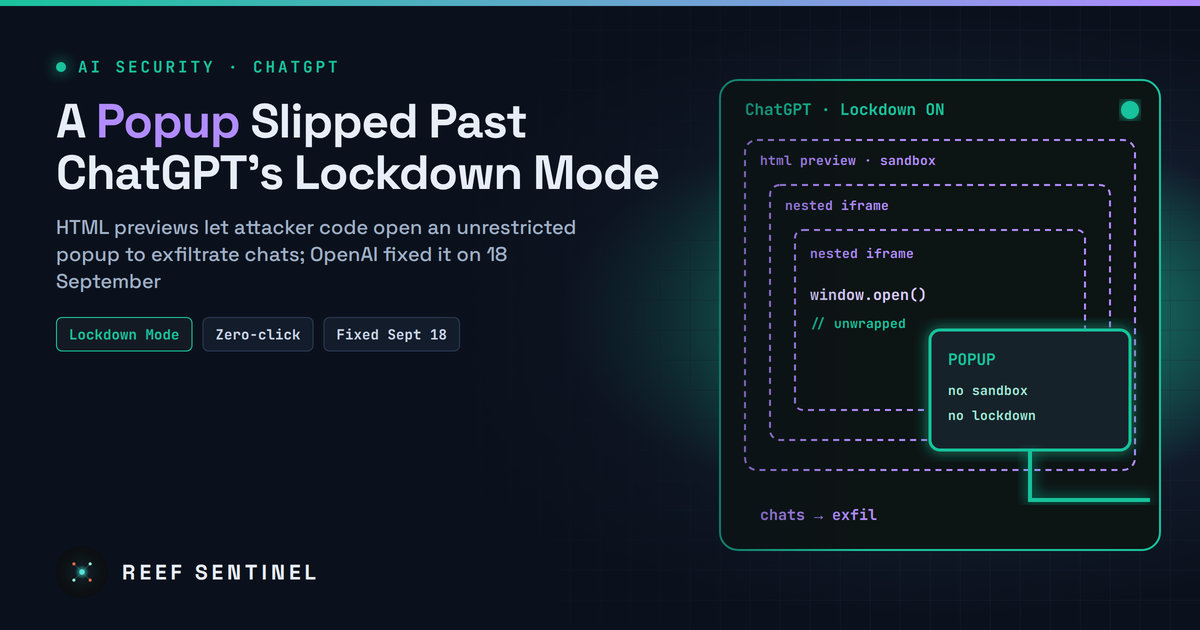
An unwrapped popup function reachable from nested sandboxed preview frames let attacker-controlled HTML escape ChatGPT's Lockdown Mode network restrictions to exfiltrate chats or show malware lures, which OpenAI fixed on 18 September 2026.

What Happened

Security researchers have disclosed a way to bypass ChatGPT's Lockdown Mode, the optional setting OpenAI introduced earlier this year to stop prompt injection attacks from sending users' data to attacker-controlled servers. The researchers say the bypass could exfiltrate chat data and messages, with zero clicks in the ChatGPT desktop app, and could show victims attacker-controlled content able to deliver malware.

OpenAI fixed the issue on 18 September 2026 after responsible disclosure. The details were made public on 5 November. There is no report of exploitation in the wild, and users do not need to do anything for the server-side part of the fix beyond keeping the desktop app up to date.

What Lockdown Mode Is Supposed to Do

Prompt injection is still the main unsolved problem for AI assistants. Hidden instructions in a web page, a document or a shared chat can tell the model to collect sensitive data and send it somewhere. Lockdown Mode reduces this risk at the network level rather than relying on the model to resist. It restricts features that connect ChatGPT to the internet or outside services, so a model that has been tricked has nowhere to send what it collected.

OpenAI has always said the mode greatly reduces prompt injection risk rather than eliminating it. The new research shows where the remaining gap was.

Technical Details

The weak point was not the model but the HTML preview feature. ChatGPT can render code blocks containing HTML and JavaScript as live previews. These previews run in sandboxed, nested frames. They cannot read the app's cookies or local storage, and they are not supposed to contact external resources without the user's consent.

According to the researchers:

That gave an attacker a channel out of the locked-down session. The researchers describe two results:

The researchers say the problem was not limited to the Electron-based desktop app.

How an Attack Would Start

The malicious HTML and JavaScript have to reach the conversation first. The researchers list three routes:

This is the second ChatGPT sandbox issue made public in about a week. Separate researchers recently described a sandbox and Content Security Policy bypass that could take over accounts through a malicious shared link. Both point to the same weak spot: features that render active content inside the chat window.

Who Is Affected

Users who turned on Lockdown Mode before the 18 September fix, which is exactly the group that had decided its chats were sensitive enough to need it. Organisations using ChatGPT Enterprise or Edu with Lockdown Mode as a control for data-loss risk should treat the protection as weaker than assumed during that period.

What To Do Now

Why It Matters

Lockdown Mode is the kind of control security teams prefer, because it does not depend on the model resisting manipulation. This research shows that such a control is only as strong as the application around it. A rendering feature that was never designed as a network boundary turned out to be one. As the researchers put it, AI security controls are only as strong as the wider application environment around them.

For organisations rolling out AI assistants, the lesson is to threat-model the whole client, including previews, popups, shared links and plugins, and not just the model and its prompts.

COMPUTE NODE · · --:--:--

Fresh cybersecurity news,
daily threat intelligence.

Daily cyber news, live threat intel and exploited CVEs.

Everything in one place

Self-hosted, hardened, and yours.

RUN IT

Local AI console

Chat with a model on your own hardware via Ollama or any OpenAI-compatible server. No cloud, no key.

DEFEND

Cyber threat feed

Automatic daily intel from CISA KEV, NVD & GitHub advisories, a live cyber threat map, and your own notes.

NEWS

News & videos

Articles and updates on pentesting, AI, and cyber — with embedded video, including YouTube. Post your own.

DIRECTORY

Registry

Runtimes, models, MCP servers, agents, and a full security & pentest tooling section.

PUBLISH

Posts

Write, edit, publish, and share articles backed by a real database and your account.

COMMUNITY

Forum

Threads and replies across categories from Models to Hardware to Security.

CODE

Repos

Curated AI and security GitHub repos, plus a shelf for pinning your own.

DOWNLOAD

Skill packs

Agent starters, RAG scaffolds, and defensive security & VAPT report templates.

Registry

Runtimes, models, MCP servers, agent frameworks, and a security & pentest tooling section — all links out to the real projects.

Local AI console

Talk to a model running on your own machine through Ollama or an OpenAI-compatible server — your prompts and the model's replies always go straight from your browser to your local model, never through a Reef server. Attach files for context, and pick up saved chats where you left off.

Type /image a prompt in the box below to generate
Not connected

Local AI hardware benchmark

A spec-based compatibility advisor — tells you which local models your hardware can run well, which will be slow, and which to skip. Connect to Ollama below for a real, measured speed test instead of an estimate.

1. Your hardware

2. Live check against your local model server (optional)

If a local model server is running, this cross-references the table above with what you've actually got loaded — and runs a real, measured speed test instead of an estimate.

AI Database

A browsable catalog of AI models across providers — context windows, pricing, and capabilities.

Loading…

Cyber threat feed

Latest threats pulled automatically every day from CISA's Known-Exploited-Vulnerabilities catalog and NVD — plus threat intel you post yourself.

⇩ Export STIX
Loading threat feed…

Cyber threat map

Attacks happening right now, all over the world.

Connecting…
LIVE · MAURITIUS TIME--:--:--
attack route, country to country attack route into Mauritius attacker reported worldwide
Loading live data…
attackers reported per minute · click to rewindnow

Top attack routesweb

Attackers based inlast hour

Networkslast hour

Click any dot, feed row or table row to see that IP's profile.

Mauritius

Who attacks Mauritius

Loading…

Web attacks malicious requests to Mauritian websites that were blocked
Network DDoS floods meant to knock Mauritian servers offline

    Mauritius · last 24 h

    How Mauritius is attacked

    Network-level attacks (DDoS) aimed at Mauritius, by method. They try to knock servers and networks offline by sheer volume.

    • Loading…

    The ports or services these floods aimed at aren't published.

    Mauritius · last hour

    Attackers located in Mauritius

    0attackers located in Mauritius were reported in the last hour

    This counts attacks coming from Mauritius, not attacks on it: IPs in Mauritius that servers elsewhere reported for attacking them. Usually zero or one; when it rises, it's often a hacked local server or router.

    Worldwide today

    What attackers are knocking on

    Ports most targeted across a worldwide network of sensors .

    Worldwide today

    Most active attackers

    Ranked by how many separate sensors they hit. Click a row for its profile.

    IPCountryNetworkSensors hitReports
    What you're looking at
    Blue routes

    Share of attack traffic from one country to another. Thicker, faster streams carry more. Particles show volume, not one per attack.

    Every 15 min · published 1–2 h behind
    Amber flashes

    An attacking IP that servers around the world reported in the last minute, placed where the IP is. Its targets aren't published, so there's no line.

    Every minute · shown about 1 min behind
    Locations

    IP locations are approximate (city level at best) and show where the machine is hosted, not who controls it.

    Approximate · city level at best

    News

    Articles, guides and updates on pentesting, AI, and cybersecurity — with embedded video. Add your own, including YouTube.

    Loading…

    Posts

    Loading…

    Loading posts…

    Forum

    Questions, answers, and talk about running AI locally.

    Loading forum…

    GitHub repositories

    Curated AI and security repos, plus your own pinned shelf.

    Command board

    One-liners, configs, and advice worth keeping — shared by everyone here.

    ⚠ Commands are shared with all users. Never include credentials, tokens, or internal hostnames. Review anything before you run it.
    Loading commands…

    Skill packs

    Starter files served from the API — AI agent scaffolds plus defensive security & VAPT reporting templates. Click to download.

    Loading skills…

    Threat Library

    Threat actors, malware and tools — their attack techniques, Reef Sentinel coverage and indicators of compromise.

    Loading…

    Threat Intelligence

    Curated threat write-ups, advisories and analysis — with cover media.

    Loading…

    Tutorials

    Step-by-step guides for running local AI, using the console, and tracking threats. Admins can add their own.

    Loading…

    Downloads

    Direct links to the official homepage/download page for well-known cybersecurity, penetration-testing, and local-AI software. Always verify checksums/signatures from the vendor before running anything.

    Loading…

    Terms & Conditions

    Loading…

    Help & FAQ

    Answers to common questions about Reef Sentinel, plus a formatting guide for posts, articles, and comments.


    Formatting guide

    Commands you can type into the body of a post, comment, or reply — no HTML needed. Comments and short replies only support bold, italic, and inline code.

    Contact us

    Questions, feedback, or a security disclosure? Reach us directly, or send a message and we'll get back to you by email.

    Loading…

    Send a message

    VAPT Report Generator

    Build an engagement, add findings with a live CVSS calculator, and generate a branded, print-ready report.

    Recon Toolkit

    Passive OSINT lookups for the recon phase of an engagement, plus offline hash identification and a payload cheatsheet.

    Website Checker

    Reads a website's HTTP response headers to identify its framework and server, shows any known CVEs for the exposed versions with details, and recommends what to do.

    Control panel

    Manage everything shown on the site — news & videos, posts, homepage headlines, and subscribers. Admin only.

    Overview
    Content
    Site
    Account & Security

    Email settings

    SMTP on ports 25/465/587 is blocked outbound by some hosts (e.g. DigitalOcean droplets by default) — Resend and Brevo send over their HTTPS API instead, so they work even then. Only the selected provider is used to send; the others stay saved but idle, so you can switch back any time without losing settings.

    Get a key from resend.com/api-keys. Uses the "From address" below as the sender — it must be on a domain you've verified with Resend.

    Get an API key (not an SMTP key) from app.brevo.com/settings/keys/api. Uses the "From address" below as the sender — it must be a verified sender in your Brevo account.

    "From address" and "Site name/URL" are shared by SMTP, Resend, and Brevo — they control what recipients see, regardless of which provider is active.

    Send a test email

    Sends through whichever provider is currently active above. Save your settings first if you just changed them.