Microsoft 365 Outage Knocks Out Outlook and Exchange Online for Hours: Failing Server Health Checks and an Overwhelmed Core Process Behind Incident EX1550543
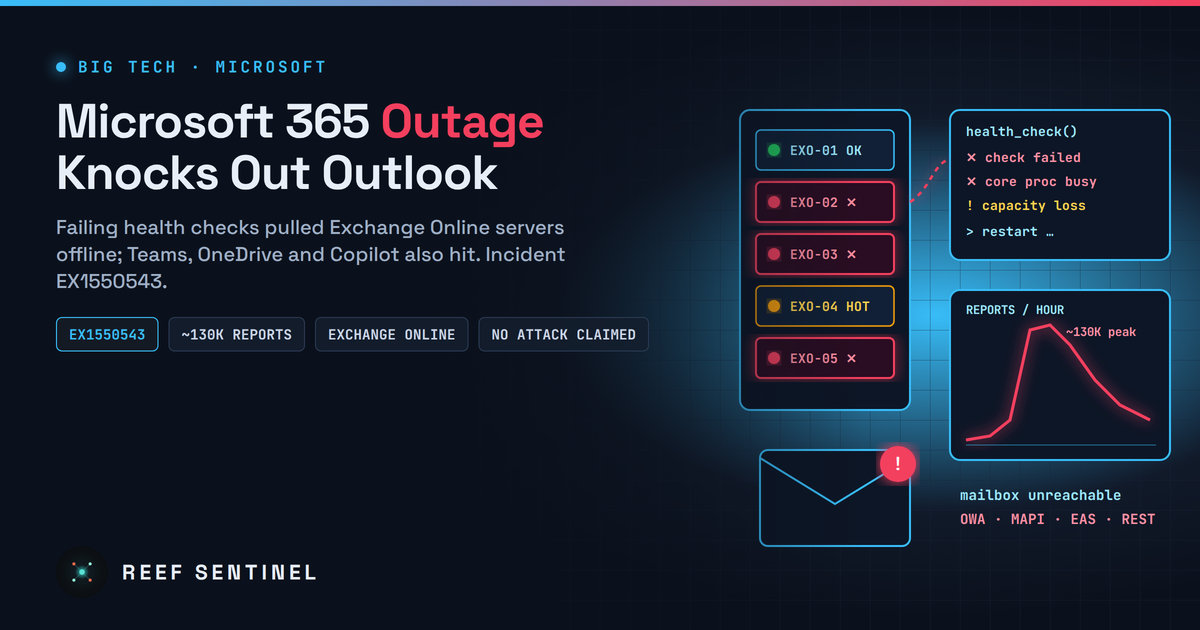
A Microsoft 365 outage on 12 November cut off Exchange Online mailboxes, starting in the Americas and spreading across regions, with Teams, OneDrive and Copilot also hit, after servers failed health checks and a core process became overwhelmed.
What Happened
On Thursday, 12 November 2026, a major Microsoft 365 outage cut off Exchange Online mailboxes for a large share of users. It started in the Americas around 17:30 UTC (12:30 p.m. Eastern), and Microsoft soon warned it could affect connectivity "for users in any region". Outlook went down first, but reports also came in for Teams, SharePoint Online, OneDrive and Microsoft 365 Copilot.
On Downdetector, Outlook problem reports peaked at roughly 130,000 shortly after 13:00 Eastern, and Microsoft 365 reports topped 45,000. Microsoft tracked the incident in the Microsoft 365 admin center as EX1550543, with related updates under MO1550821. Exchange Online access failed across several connection methods, including Outlook on the web, MAPI (desktop Outlook), Exchange ActiveSync (mobile mail apps) and the REST API.
Microsoft has not said anything about a cyberattack, and nobody has claimed responsibility. Everything Microsoft has published so far describes an internal capacity and health-check failure.
The Details: How Microsoft's Explanation Changed
Microsoft's status updates through the afternoon show the root cause becoming clearer step by step:
- First explanation: Microsoft said "a portion of infrastructure is experiencing elevated load across multiple regions" and began redistributing connection traffic across its wider worldwide infrastructure.
- Revised explanation: Microsoft then said the load was not caused by more traffic. A number of servers had become unexpectedly unavailable, and the remaining servers were straining to absorb their share.
- Health checks: Microsoft said the affected servers were failing automated health checks. It had found no recent change that lined up with the start of impact, and said the failed health checks "may originate from a specific component that's responsible for processing server health."
- Emergency measures: Microsoft paused all deployments, moved traffic off the affected infrastructure, restarted servers, and looked at whether rolling back "a small number of recent configuration updates" could speed up recovery.
- Escalation: Microsoft later said its actions so far had not brought the relief it expected. It found that "a core process on affected servers is becoming overwhelmed, causing capacity loss," and began isolating infrastructure, restarting components and bringing traffic back in stages.
- Partial recovery: Microsoft validated an alternative health-check method that let some of the affected servers return to service, began rolling it out more widely, and prepared automated recovery to detect and restart unresponsive servers. It warned that users would see recovery gradually as their clients reconnected.
Teams problems in North America were reported as fixed earlier in the day. At the time of writing, we could not confirm any Microsoft statement declaring the Exchange Online incident fully resolved. Microsoft has not yet published a post-incident review.
Why It Matters
This was not a breach, but it is still a security story. Exchange Online is more than email for most organisations. It carries password-reset links, MFA and approval prompts, security alerts, legal holds and much of the daily communication with customers and suppliers. Losing it for several hours on a weekday afternoon in the Americas breaks many processes that defenders count on.
Three points stand out:
- The cause was a self-inflicted health-check failure. Microsoft's own monitoring component appears to have marked healthy capacity as failed, or failed to bring it back. Automated self-healing that goes wrong can take out capacity faster than people can restore it.
- Outages attract phishing. Large, well-publicised outages reliably bring fake "Microsoft 365 service restored, sign in again" emails, bogus status pages and helpdesk impersonation calls. Users who were just locked out are more likely to enter credentials into whatever login page appears.
- Concentration risk is real. When mail, chat, file sharing, AI assistants and parts of the security stack all run on one provider, one capacity failure hits all of them together. Some reports also mentioned problems reaching Defender XDR, though Microsoft's own posts did not confirm that.
What It Means for Users and IT Teams
For users:
- Be suspicious of any message about the outage that asks you to sign in, "re-verify" your mailbox or install anything. Go to your portal directly instead of clicking links.
- If your desktop or mobile client is still failing, restart it and give it time to reconnect. Microsoft said recovery would reach clients gradually.
For IT and security teams:
- Follow EX1550543 and MO1550821 in the Microsoft 365 admin center (Service health), and save the final post-incident report when Microsoft publishes it. You will need it for SLA claims and your own incident records.
- Send staff a short anti-phishing notice now. Phishing themed on the outage usually follows within hours.
- Check for mail that was delayed or bounced while the outage lasted, and confirm that time-sensitive alerts (SIEM, backup, monitoring notifications sent to Exchange mailboxes) actually arrived or were re-sent.
- Review your out-of-band plans: a non-Microsoft channel for incident communications, alerting that does not rely only on Exchange Online, and a documented break-glass process for when the admin portal or mail is unavailable.
- You can check service health from a script during future incidents with Microsoft Graph, for example:
Connect-MgGraph -Scopes "ServiceHealth.Read.All"
Get-MgServiceAnnouncementIssue -Filter "id eq 'EX1550543'" |
  Select-Object Id, Title, Status, StartDateTime, EndDateTime
What Happens Next
Microsoft normally publishes a preliminary post-incident review (PIR) in the admin center within a few days of a major incident, and a final one later. Key questions for that report are why the health-processing component failed, why restarts and traffic shifts did not bring relief at first, and whether the configuration updates Microsoft looked at played any role. Organisations with financially backed SLAs should check their eligibility for service credits once Microsoft confirms the official duration of the outage.
