Researchers Bypassed ChatGPT's Lockdown Mode Through an HTML Preview Popup — Zero-Click Chat Exfiltration in the Desktop App, Fixed by OpenAI
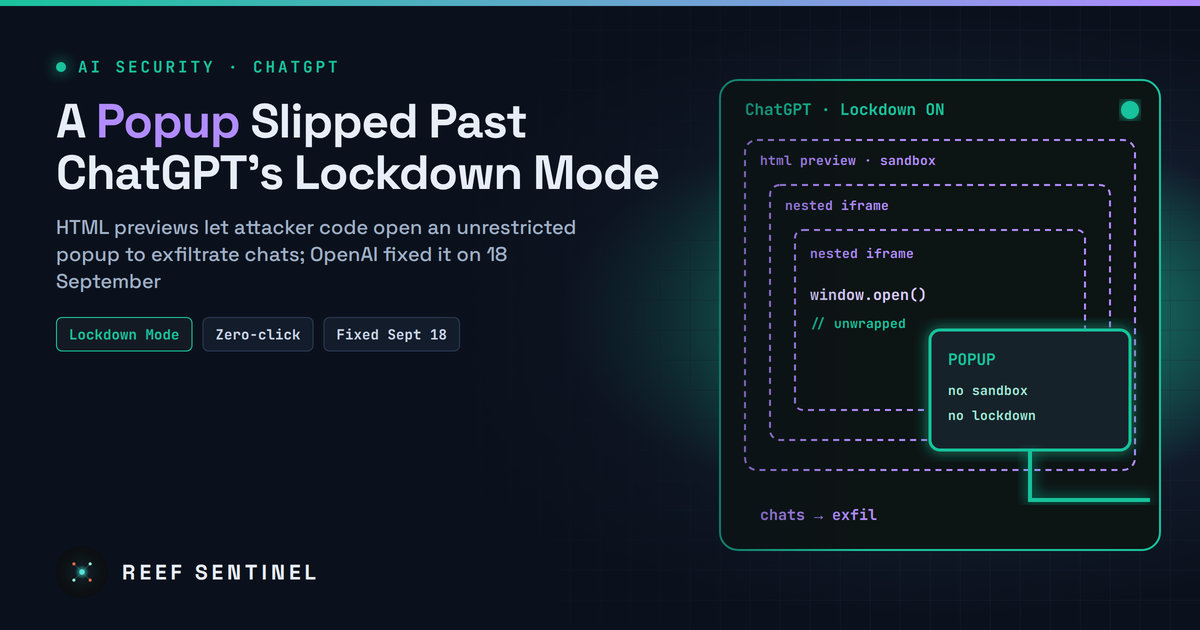
An unwrapped popup function reachable from nested sandboxed preview frames let attacker-controlled HTML escape ChatGPT's Lockdown Mode network restrictions to exfiltrate chats or show malware lures, which OpenAI fixed on 18 September 2026.
What Happened
Security researchers have disclosed a way to bypass ChatGPT's Lockdown Mode, the optional setting OpenAI introduced earlier this year to stop prompt injection attacks from sending users' data to attacker-controlled servers. The researchers say the bypass could exfiltrate chat data and messages, with zero clicks in the ChatGPT desktop app, and could show victims attacker-controlled content able to deliver malware.
OpenAI fixed the issue on 18 September 2026 after responsible disclosure. The details were made public on 5 November. There is no report of exploitation in the wild, and users do not need to do anything for the server-side part of the fix beyond keeping the desktop app up to date.
What Lockdown Mode Is Supposed to Do
Prompt injection is still the main unsolved problem for AI assistants. Hidden instructions in a web page, a document or a shared chat can tell the model to collect sensitive data and send it somewhere. Lockdown Mode reduces this risk at the network level rather than relying on the model to resist. It restricts features that connect ChatGPT to the internet or outside services, so a model that has been tricked has nowhere to send what it collected.
OpenAI has always said the mode greatly reduces prompt injection risk rather than eliminating it. The new research shows where the remaining gap was.
Technical Details
The weak point was not the model but the HTML preview feature. ChatGPT can render code blocks containing HTML and JavaScript as live previews. These previews run in sandboxed, nested frames. They cannot read the app's cookies or local storage, and they are not supposed to contact external resources without the user's consent.
According to the researchers:
- ChatGPT blocked direct attempts by preview code to open new windows.
- The sandbox permissions, however, still allowed popups, and popups opened from a sandboxed frame can escape the sandbox's restrictions.
- By creating another nested frame, attacker-controlled code could reach an unmodified popup function that ChatGPT had not wrapped.
- Content opened this way was not subject to the preview's restrictions, and therefore not to Lockdown Mode's network controls.
That gave an attacker a channel out of the locked-down session. The researchers describe two results:
- Data exfiltration. Chat content and messages could be sent to attacker infrastructure. In the desktop app, the researchers describe this as zero-click.
- Malware delivery. Because the popup's content is fully controlled by the attacker, it could show convincing lures such as a fake ChatGPT update. That scenario needs the victim to click a link in the popup.
The researchers say the problem was not limited to the Electron-based desktop app.
How an Attack Would Start
The malicious HTML and JavaScript have to reach the conversation first. The researchers list three routes:
- A crafted prompt, including text the user pastes from an untrusted source.
- A malicious custom GPT whose instructions make it produce the payload.
- A shared chat link that a victim opens and continues.
This is the second ChatGPT sandbox issue made public in about a week. Separate researchers recently described a sandbox and Content Security Policy bypass that could take over accounts through a malicious shared link. Both point to the same weak spot: features that render active content inside the chat window.
Who Is Affected
Users who turned on Lockdown Mode before the 18 September fix, which is exactly the group that had decided its chats were sensitive enough to need it. Organisations using ChatGPT Enterprise or Edu with Lockdown Mode as a control for data-loss risk should treat the protection as weaker than assumed during that period.
What To Do Now
- Keep the ChatGPT desktop app updated and remove outdated installs from managed endpoints.
- Treat shared chats and third-party custom GPTs as untrusted input, especially in Lockdown Mode sessions that handle sensitive material. Restrict which custom GPTs your workspace can use.
- Never act on update prompts that appear inside a chat or popup. Get desktop updates only through the app's own updater or your software deployment tooling.
- Don't treat Lockdown Mode as your only control. Keep the most sensitive data out of AI chats entirely, and use enterprise data-loss prevention and egress monitoring on endpoints.
- Review vendor documentation for which features stay active in Lockdown Mode, such as previews, canvases and file rendering, and turn off the ones you don't need.
Why It Matters
Lockdown Mode is the kind of control security teams prefer, because it does not depend on the model resisting manipulation. This research shows that such a control is only as strong as the application around it. A rendering feature that was never designed as a network boundary turned out to be one. As the researchers put it, AI security controls are only as strong as the wider application environment around them.
For organisations rolling out AI assistants, the lesson is to threat-model the whole client, including previews, popups, shared links and plugins, and not just the model and its prompts.
