Falcon C2 Runs Espionage From Inside the Browser: Injected Roundcube Scripts, a Fake 'PDF Viewer' Extension and the OneDrive-Controlled Antino Implant Hit Five Governments
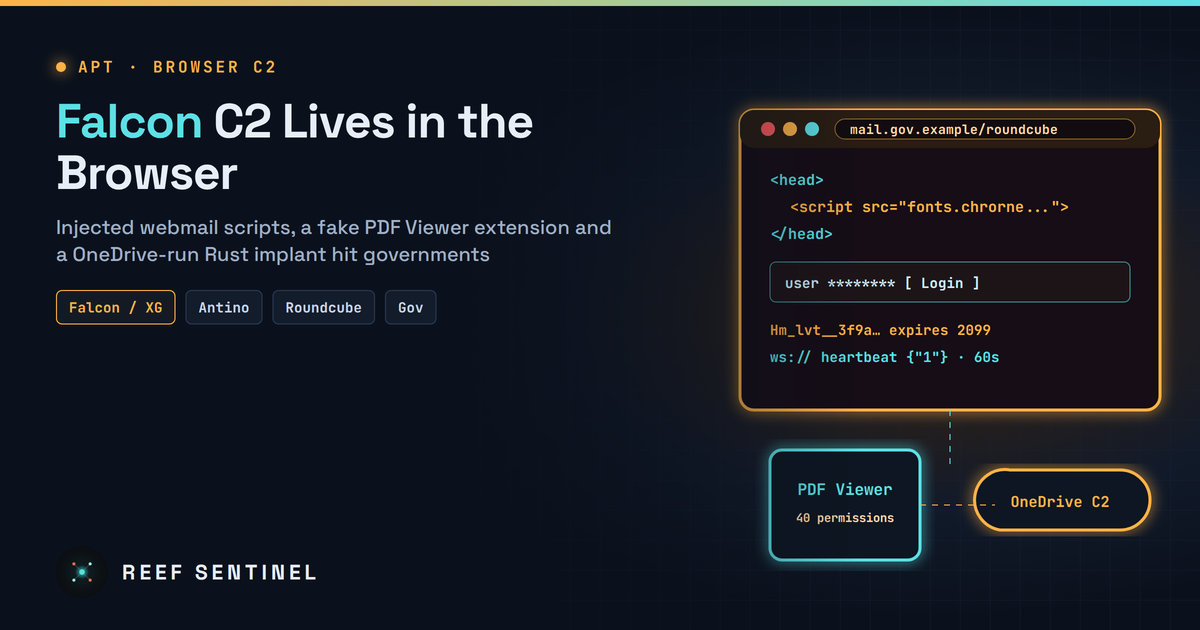
Researchers detail Falcon, a browser-resident C2 framework related to PeckBirdy that compromised 39 Roundcube portals and government apps in the Middle East and Southeast Asia, sideloaded a 40-permission spy extension and delivered the Rust-based Antino implant via a fake Flash update.
Overview
Security researchers have published a detailed look at Falcon (also called XG, or Xiàng Gē), a Node.js command-and-control framework that runs malicious JavaScript directly inside victims' browsers. Between March and May 2026 the operator planted Falcon scripts on government webmail portals and internal web applications. They used it to steal passwords, emails, session cookies and internal documents. Falcon also sideloaded a malicious "PDF Viewer" browser extension and delivered Antino, a Rust implant that uses Microsoft OneDrive as its command channel.
The researchers assess with high confidence that Falcon and PeckBirdy, a framework reported publicly in January 2026, are variants of the same core codebase. They did not name the operator. Their related references point to China-nexus activity that has also used Antino.
The Campaign
Victims were government bodies in one Middle Eastern country and four Southeast Asian countries. They included ministries of foreign affairs, defence and interior, police and justice agencies, a national network-services agency, a telecom provider and government email systems. The targeting fits strategic intelligence collection.
- Middle East (April 2026): a script tag was injected into the header of a ministry's Roundcube webmail portal. It loaded the obfuscated Falcon implant, which intercepted credentials as users logged in. Researchers counted 39 affected Roundcube instances in that country.
- Southeast Asia, police (May 2026): a custom module harvested usernames from the login page. A second module showed hard-coded target users a fake Adobe Flash Player update prompt, up to 10 times. The "update" was the Antino implant.
- Southeast Asia, justice (early 2026): a malicious Chrome extension posing as a PDF viewer was sideloaded in developer mode. It held a WebSocket open and checked in every 3–4 minutes for more than three weeks. The operator browsed routing slips in an internal document system, screenshotted a document and stole credentials. More than 20 further routing-slip page views were recorded between late April and mid-May.
Timeline
- 6 October 2025: compile timestamp of the earliest known Antino sample.
- January 2026: PeckBirdy is first described publicly.
- Early 2026: the justice-sector compromise begins.
- March–May 2026: main campaign window.
- 23 and 25 April 2026: silent Chrome and Firefox installer tools are uploaded to the operator's panel.
- 13 May 2026: version date of the malicious extension (2026.5.13.1).
- 11 November 2026: research published.
Tradecraft
The Falcon server hides in plain sight. Its panel is a blank page with right-click disabled. The login form appears only after F9 is pressed three times. On port 443 the victim-facing server serves a JavaScript Tetris or Snake game, while the management panel listens on TCP 8080.
The implant blends in with analytics. Each session gets a freshly generated, XOR-encoded script. A 32-character session ID is stored in local storage (Hm_lvt_$), in a cookie named Hm_lvt__<id> that expires in 2099, and in extension storage. The Baidu-Analytics-style names are meant to look like normal tracking traffic. Traffic runs over a TLS WebSocket with a one-minute heartbeat. Payloads are protected with AES-256-CBC keys exchanged under RSA-2048, and an unencrypted "Comet" protocol serves as fallback. The core command is run, which executes arbitrary JavaScript.
The extension is a full browser spy. The Manifest V3 "PDF Viewer" requests 40 permissions with access to all URLs. It can:
- steal credentials, cookies, browsing history and download history;
- rewrite clipboard contents, such as account numbers or crypto addresses, using operator-defined rules;
- hook fetch and XHR traffic, including Discord and Zalo data;
- exfiltrate Gmail using the victim's session;
- scrape X/Twitter direct messages;
- swap downloaded executables for attacker files while keeping the original name, such as
ChromeSetup.exe; - act as a web proxy that reuses the victim's browser identity.
Antino copies itself to %LOCALAPPDATA%\Windows GatherOSStateKit\ and abuses sdiagnhost.exe to add a Run key. It writes heartbeats to antino/heartbeat/<BotID>.json in an attacker-controlled OneDrive and picks up command files from the same drive. It supports ten commands, including shell execution, process listing, file upload and download, and running programs.
Researchers also note signs that Falcon was built with AI assistance, including its coding style and inconsistent design choices.
Indicators of Compromise
Falcon C2 domains:
fonts.tarotfree101[.]top
fonts.chrorne[.]com
robot.avbliud[.]com
Payload delivery:
microsoft-flash[.]com
wps-cn[.]com
hxxps[:]//microsoft-flash[.]com/download/Adobe_installer.exe
Malicious Chrome extension ID: mbidcmlcbgbphpoacojjbmfpohcimjji
Antino sample (flashcenter_pp_ax_install_en.exe), SHA-256:
0c39264337a1186b2e765e24073399cbdcba118306614eb411e315887af578bdExtension background.js (Chrome), SHA-256:
f8b86238e179d88a9979b6f97750a39dda1d07b54d634bc1348fdfb0944a3b92Detection
- Hunt for browser extensions loaded in developer mode, especially PDF-viewer lookalikes that request
<all_urls>,debugger,tabCapture,nativeMessagingorwebRequest. - Flag
Hm_lvt_cookies or local-storage keys on internal or government applications where Baidu Analytics has no legitimate role. - Review page templates of webmail (Roundcube in particular), ticketing and case-management portals for script tags that load from unfamiliar domains. Pay attention to scripts that return large numeric arrays with a small decoder loop.
- Watch for OAuth and Graph activity to OneDrive tenants outside your organisation, especially repeated small JSON writes under
antino/heartbeat/orantino/antino_upload/. - On endpoints, look for executables under
%LOCALAPPDATA%\Windows GatherOSStateKit\and unexpectedsdiagnhost.exelaunches that create Run keys.
Recommended Actions
- Block the domains and the extension ID above at DNS, proxy and browser-management level.
- Enforce an extension allowlist through browser policy and disable developer-mode sideloading on managed devices.
- Run file-integrity monitoring on webmail and intranet web roots. Diff Roundcube templates against a clean vendor copy.
- If you find a compromise, reset passwords and revoke sessions for every user of the affected portal. Treat stolen cookies as valid until they are invalidated.
- Restrict OneDrive and Graph access to approved tenants where your tooling supports tenant restrictions.
Analyst Assessment
Falcon shows that a browser-resident C2 is enough for serious espionage. By compromising the web portal instead of the endpoint, the operator collected credentials from every visitor without writing anything to disk. Antino was deployed only where deeper access was worth the risk. The small campaign footprint, sector focus and shared lineage with PeckBirdy point to a well-resourced, state-aligned actor. Organisations running self-hosted webmail, particularly governments in Southeast Asia and the Middle East, should treat web-root integrity and browser-extension control as first-line defences, not hygiene items.
