FastUnlock Shows BitLocker's Real Perimeter on a Sleeping Laptop Is the Lock Screen, and Narrator Just Walked Through It
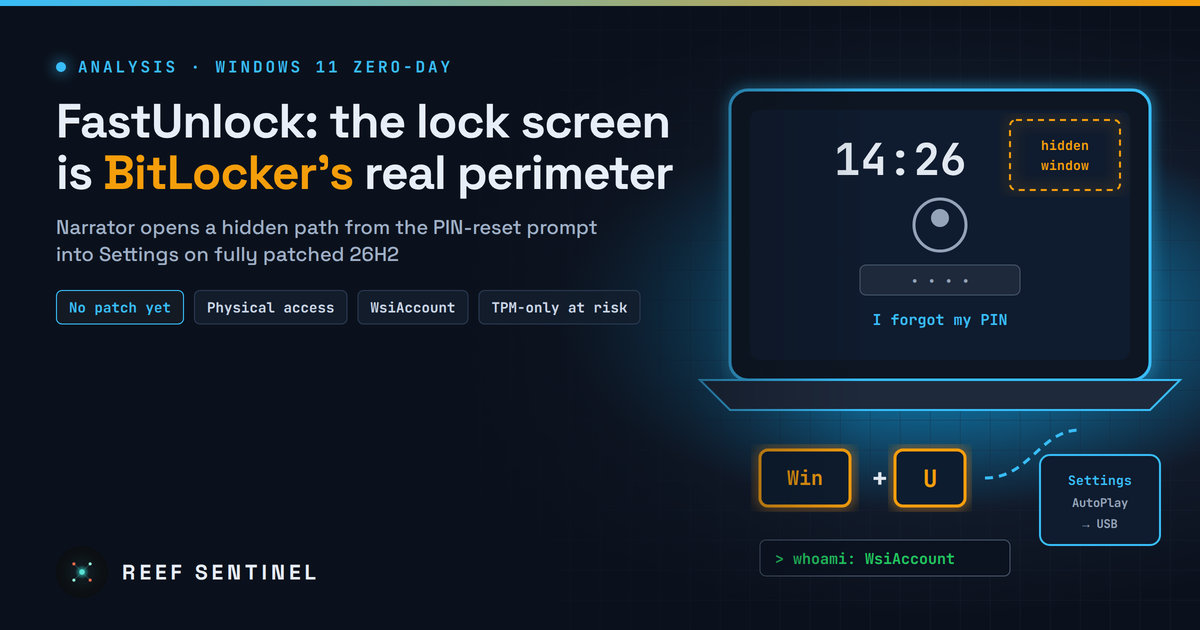
FastUnlock Shows BitLocker's Real Perimeter on a Sleeping Laptop Is the Lock Screen, and Narrator Just Walked Through It
A public, unpatched Windows 11 zero-day turns the Narrator screen reader into a way past the lock screen of encrypted PCs, so the real question is what BitLocker actually protects once a laptop is booted.
What was disclosed
On 19 November 2026 the researcher who goes by Chaotic Eclipse / Nightmare-Eclipse (identified as Abdelhamid Naceri) published FastUnlock on GitHub. It is a lock-screen bypass for Windows 11 26H2 with the November 2026 updates installed. The researcher did not coordinate with Microsoft first. As of 20 November there is no CVE, no advisory and no patch, and no exploitation in the wild has been reported.
At a high level the chain goes like this:
- The attacker starts at the sign-in screen and opens the "I forgot my PIN" (or password) recovery flow, which needs at least one account on the machine to be linked to an online Microsoft account.
- While the reset prompt is open, Win+U opens accessibility settings and the attacker turns on Narrator.
- According to the write-up, Narrator's redesigned interface spawns a hidden window even in the lock-screen context. The old check that stopped it running as SYSTEM is still there, but nothing stops it running as the lock-screen user.
- Using Narrator's keyboard controls, the attacker moves from that invisible window into the Settings app. From there, the researcher says "multiple ways" lead to code execution. The route he describes goes through AutoPlay and a USB stick, and code runs as
WsiAccount, the account Windows uses for the lock-screen experience.
There is one honest caveat: the researcher says he did not film the final USB step because he had no USB stick to hand. He says he has done it "enough times to know what happens next". The escape into Settings is shown on video. The last step is claimed, not demonstrated.
"Bypassing BitLocker" is the wrong headline, and the right one is worse
Several headlines say FastUnlock "bypasses BitLocker". It doesn't break the encryption. No keys are extracted and no ciphertext is attacked. What it breaks is the assumption most organisations quietly make about encrypted laptops.
Look at how BitLocker is normally deployed. The default protector is TPM-only, and Microsoft's own countermeasures guide says it "doesn't require any interaction with the user to unlock". The TPM checks that the boot chain hasn't been tampered with and releases the key. By the time the lock screen appears, the volume is already unlocked and Windows is reading it in the clear. From that moment on, the lock screen is the only thing between someone holding the laptop and the data. Disk encryption protects the drive once it is removed or the machine is off. A running or sleeping machine is protected by Windows' sign-in boundary.
FastUnlock attacks that boundary. So the researcher's line that it "breaks the guarantee that a properly secured bitlocker machine cannot be accessed even if the attacker has physical access" is broadly right for the most common setup: a TPM-only laptop that is asleep or sitting at the lock screen. That covers most corporate laptops left in a car, a hotel room or a checked bag.
Why accessibility keeps reopening this door
This is not the first time. The same researcher points to an earlier lock-screen bypass of his, ZDI-21-1053. Researchers have also linked him to a 2021 Narrator-based bypass on touch devices. The pattern repeats for a structural reason. Accessibility tools have to work before anyone signs in, because a blind user still needs to read the sign-in screen. So Windows deliberately runs rich, interactive UI in a pre-authentication context, and each redesign of that UI brings new windows, new links and new routes into Settings. The guard that has to stop all of it is a check on who the code is running as, and here that check apparently missed a new case.
The fix for this particular window will probably be small. The lesson is broader: any feature that runs at the lock screen is part of the authentication perimeter and needs review as such. That includes accessibility tools, the account-recovery flow, network sign-in UI and the camera. According to the researcher's write-up, the flaw came in while Narrator was being given "a new look". Redesigns of pre-login UI are where these bugs come from.
WsiAccount isn't the end of the chain
Code execution as WsiAccount is not the same as being an administrator or reading a user's files, and that matters. But this researcher has also published local privilege escalations this year, including SignDrop, a CLFS-based claim of standard user to SYSTEM that we covered on 13 November and that is also unpatched. Security researchers also report that some of his earlier releases, such as RedSun and UnDefend, were later used in real intrusions. Put FastUnlock in front of a working local privilege escalation and you get a realistic path from "a locked, encrypted laptop on a desk" to SYSTEM on the running machine, with the volume already decrypted. Defenders should treat that as the threat model rather than "it only gets a lock-screen account".
Who should actually worry
- Executives, travelling staff, journalists, lawyers and anyone whose laptop is a target in itself. FastUnlock needs hands on the keyboard, so it is not a mass-exploitation bug.
- Fleets using TPM-only BitLocker that rely on sleep rather than hibernate or shutdown.
- Shared or kiosk-style machines where an online account is linked and people walk past unattended screens.
- Organisations whose incident response for lost devices assumes "encrypted, so no breach". That assumption needs revisiting until a patch ships, especially for devices lost while asleep.
Practical takeaways
- Add a pre-boot PIN (TPM+PIN) to high-risk laptops. Microsoft already recommends it against skilled attackers with physical access. It only helps if the device is actually off or hibernated when lost, so pair it with the next point.
- Prefer hibernate or shutdown over sleep for travelling devices. Set policy to hibernate after a short sleep period, and tell staff to shut down before flights and border crossings.
- Block Narrator with AppLocker or WDAC on machines whose users don't need it. This is the researcher's own interim suggestion. Weigh it against accessibility: don't take a screen reader away from someone who depends on it, and use the other controls for those users instead.
- Turn off AutoPlay for all drives (Group Policy: Windows Components › AutoPlay Policies › Turn off AutoPlay) and restrict removable storage with device control. This closes the published USB route, but the researcher says Settings offers other routes, so treat it as narrowing the attack, not fixing it.
- Review lost-device playbooks. For a TPM-only laptop lost while asleep or at the lock screen, assume possible access until Microsoft patches. Rotate credentials and tokens cached on it, and revoke the device in Entra ID or Intune.
- Watch for the fix. The next scheduled Patch Tuesday is 8 December 2026. An out-of-band update is possible given how public the details are. Once a CVE is assigned, push it to laptops first.
FastUnlock will most likely become one more CVE in a busy December. Its value is as a reminder: on a sleeping laptop, BitLocker's perimeter is the lock screen, and the lock screen runs much more code than most threat models assume.